How I Fixed A Failed VCF Managed Services Platform Deployment
TL;DR
VCF 9.1.1, 2-host management cluster. Redeploying the VCF Management Services Platform (VMSP), shown in the UI as VCF services runtime, kept failing at HEALTH0002 … Synthetic checks failed [VCFMS-BOOTSTRAP-999]. The real cause was a single anti-affinity check. I had picked Small (High Availability) in the wizard, which builds 3 control plane nodes, and 3 control plane nodes can’t be spread across 2 hosts. Redeploying as Small fixed it.
Steps To Resolve A Failed Deployment
- The Error
- SDDC Manager Logs – Not Helpful
- Troubleshooting The Bootstrap VM
- Identifying The Failing Check
- Verify Nodes On The New VMSP Cluster
- Why Did This Happen?
- Clean Up VMSP
- Redeploy VMSP
- Summary
The Error
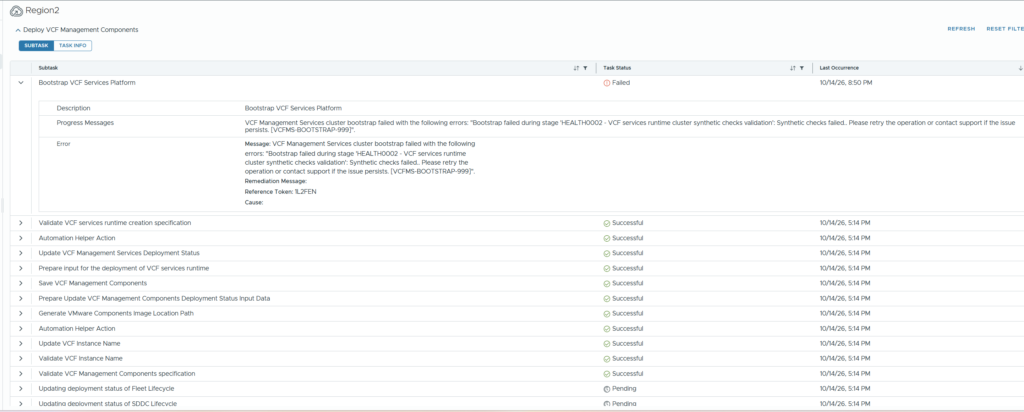
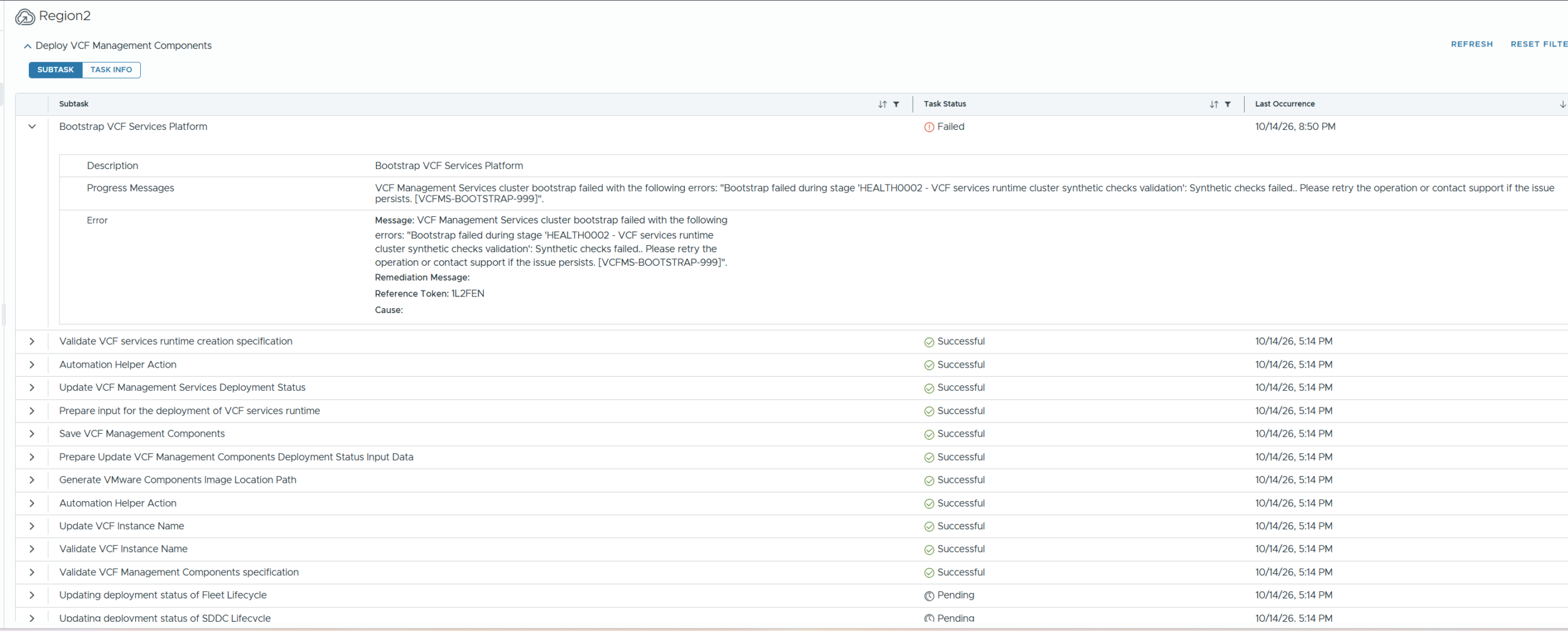
The install fails at “Bootstrap VCF Services Platform” after about 45 minutes with HEALTH0002 … Synthetic checks failed [VCFMS-BOOTSTRAP-999]. It doesn’t tell you which check failed, and retrying ends in the same result every time.
SDDC Manager Logs – Not Helpful
The obvious first stop is domainmanager.log on SDDC Manager. It only repeats the generic message. The detailed installer log never makes it back to SDDC Manager, because the upload itself fails with kubectl: Argument list too long.
zgrep -h -E 'HEALTH0002|VCFMS-BOOTSTRAP-999' /var/log/vmware/vcf/domainmanager/domainmanager.log* | tail -40Snippet of the output, the same message repeated for every attempt:
LocalProcess INFO: 2026-10-14 09:40:00 - >>> HEALTH0002 - VCF services runtime cluster synthetic checks validation
LocalProcess INFO: 2026-10-14 09:48:28 - ERR:HEALTH0002 - VCF services runtime cluster synthetic checks validation
LocalProcess ERROR: 2026-10-14 09:50:17 - 2026/10/14 09:50:17 install task error message: [com.vmware.vcfms.bootstrap.GenericError] Bootstrap failed during stage 'HEALTH0002 - VCF services runtime cluster synthetic checks validation': Synthetic checks failed.. Please retry the operation or contact support if the issue persists. [VCFMS-BOOTSTRAP-999]
Troubleshooting The Bootstrap VM
The deployment spins up a temporary bootstrap VM (hostname photonvm) in the runtime IP range. Find it in vCenter by IP and SSH in as root with the password you set in the wizard. That’s where the installer runs and where the logs live.
First, check the bootstrap VM’s own cluster for anything unhealthy. The installer pod is in an error state:
root@photonvm [ ~ ]# export KUBECONFIG=/etc/kubernetes/admin.conf
root@photonvm [ ~ ]# kubectl get pods -A | grep -vE 'Running|Completed'
NAMESPACE       NAME                                                                       READY   STATUS    RESTARTS   AGE
vmsp-platform   vsp-install-gozximgflfatpc4pzdtz2dmshq-bootstrap-execute-script-47505123   0/2     Error     0          13h
Identifying The Failing Check
Now that we know where the failure happened, the installer pod’s log tells us why. Two commands, and you may have your own way of doing this, which is fine!
Command 1: save the failed installer pod’s log to a file. This finds the pod for you, so it works in any environment:
P=$(kubectl get pods -n vmsp-platform -o name | grep bootstrap-execute-script | tail -1); kubectl logs -n vmsp-platform $P --all-containers --timestamps > /root/bootstrap-fail.log 2>&1; wc -l /root/bootstrap-fail.logCommand 2: print the check results just before the failure message:
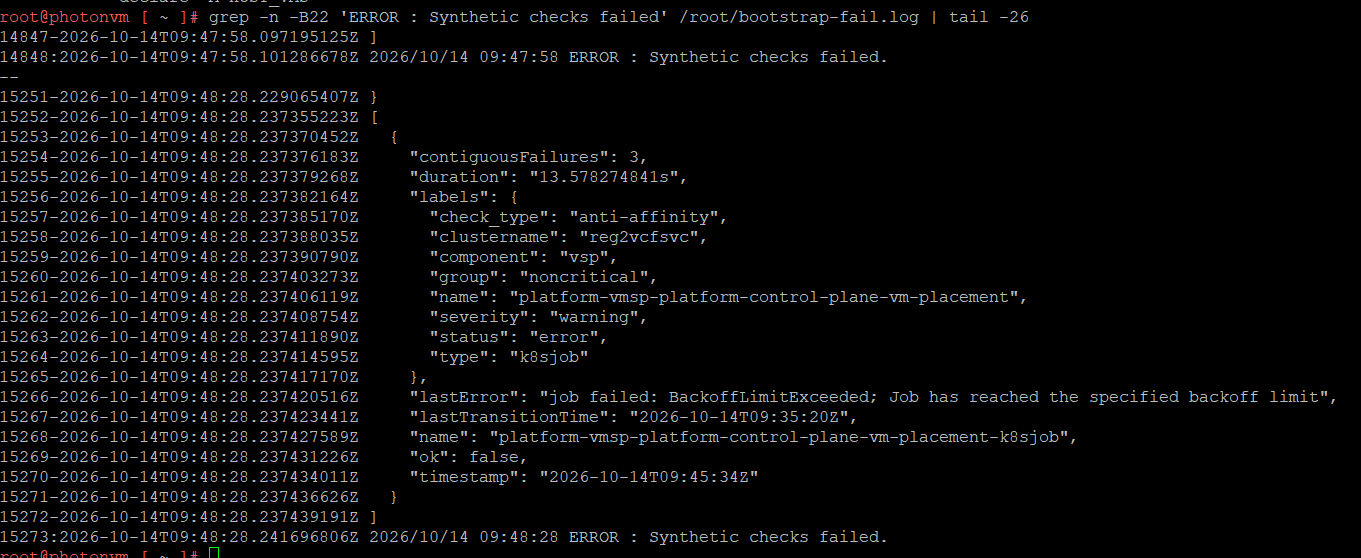
grep -n -B22 'ERROR : Synthetic checks failed' /root/bootstrap-fail.log | tail -26One check is "ok": false: platform-vmsp-platform-control-plane-vm-placement, an anti-affinity check.
Verify Nodes On The New VMSP Cluster
The bootstrap VM also holds the kubeconfig for the new VMSP cluster in /data/vmsp/. Point kubectl at it, otherwise you’ll only ever see photonvm:
export KUBECONFIG=/data/vmsp/<runtime-name>.kubeconfig
kubectl get nodes -o wide
4 nodes: 3 control plane and 1 worker.

Desired vs current state, and both match. The spec asked for 3 control plane nodes and 1 worker, and that’s exactly what was deployed. The question is why it asked for 3.
kubectl get kcp,machinedeployments -A
You can also confirm the failed check on the live cluster. If you don’t know the check name, this lists every failing check:
kubectl get checksets -A -o json | python3 -c 'import sys,json; [print(k, "| failures:", v.get("contiguousFailures"), "|", v.get("lastError","")) for i in json.load(sys.stdin)["items"] for k,v in i.get("status",{}).get("checkStatuses",{}).items() if not v.get("ok")]'Then grep that name for its full status. 158 failures in a row, ok: false. It’s labelled noncritical / warning, but it still blocks the bootstrap.
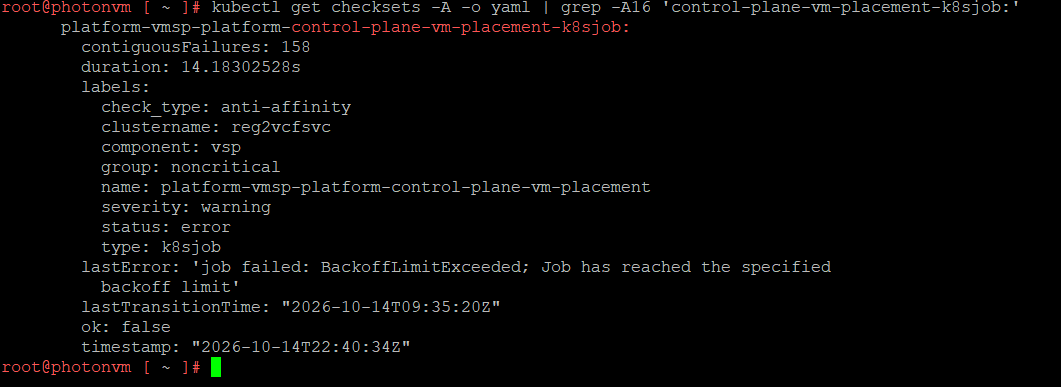
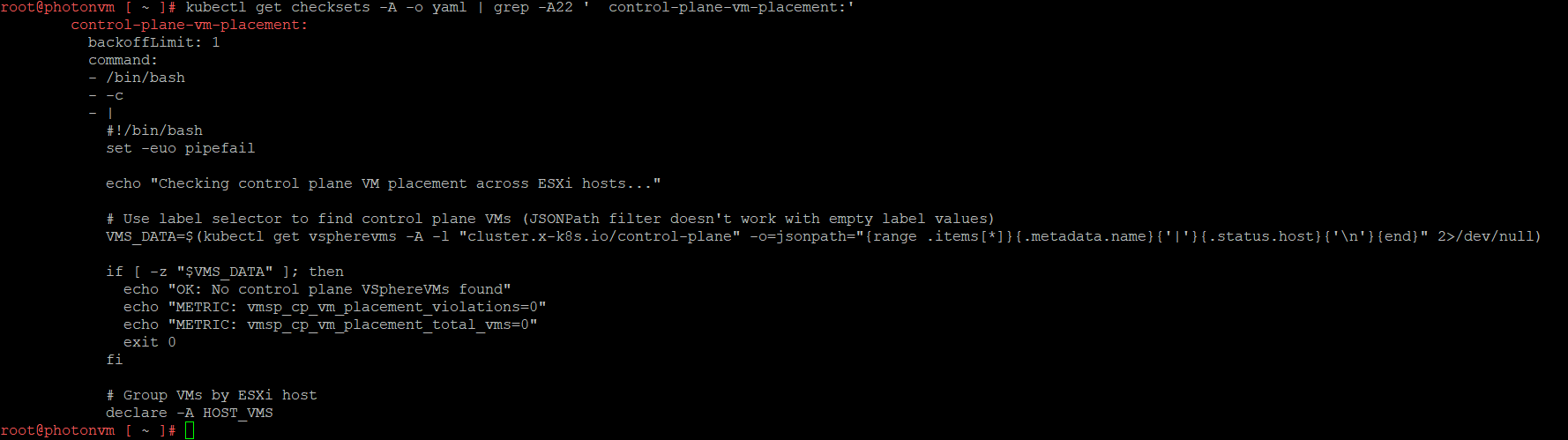
The check’s script shows what it tests: it reads which ESXi host each control plane VM runs on and fails if any host has more than one. With 3 control plane VMs and 2 hosts, it can never pass.
Why Did This Happen?
A very small but impactful difference in the t-shirt size. On the bootstrap VM, the Helm values only say clusterSize: small:

But the deploy spec in SDDC Manager’s domainmanager.log shows the request was small_ha, which means 3 control plane nodes:
zgrep -h '"size":"small_ha"' /var/log/vmware/vcf/domainmanager/domainmanager.log* | grep -oE '"[A-Za-z]+":"[^"]{1,80}"' | sort | uniq -c | sort -rn | head -12
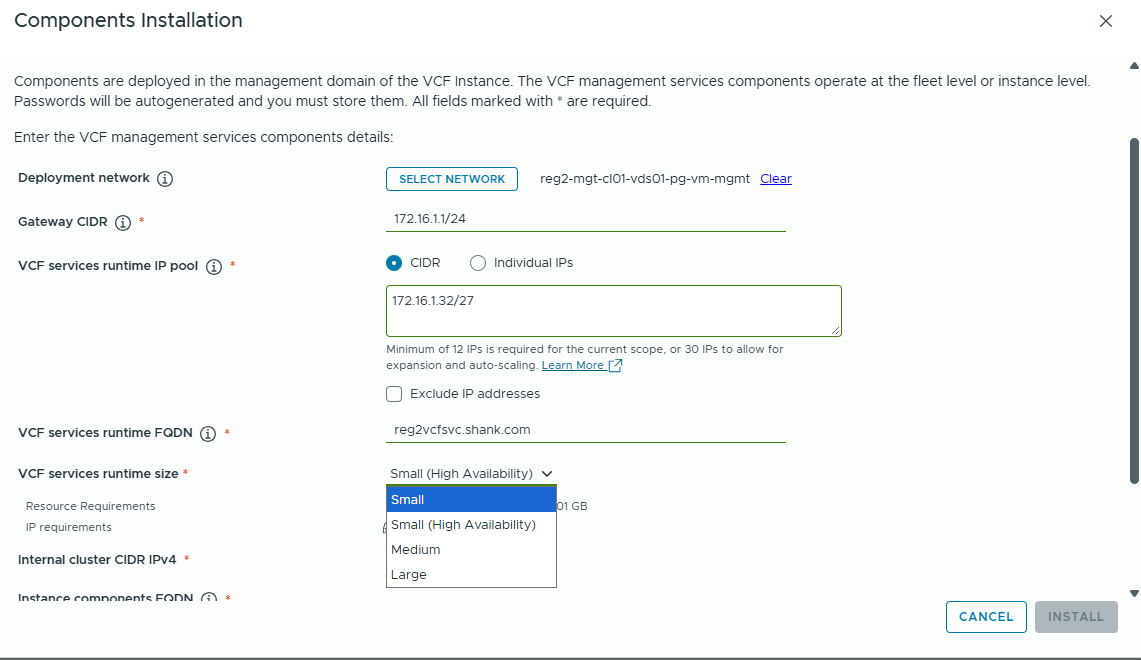
The wizard offers Small and Small (High Availability) right next to each other, and I picked the wrong one. HA means 3 control plane nodes, which needs at least 3 hosts to pass the placement check. Nothing warns you about that, and a retry reuses the same spec.
Clean Up VMSP
Before you can redeploy, clean up the failed attempt:
- KB 445132 – reset SDDC Manager so Install Components is available again
- Delete the runtime VMs and the bootstrap VM in vCenter
- KB 447187 – clean up VCF Operations, only if Ops still lists the runtime under
internal/components
If an older runtime with the same FQDN existed before, clean up Fleet first with KB 441333. More on that in part 2.
Redeploy VMSP
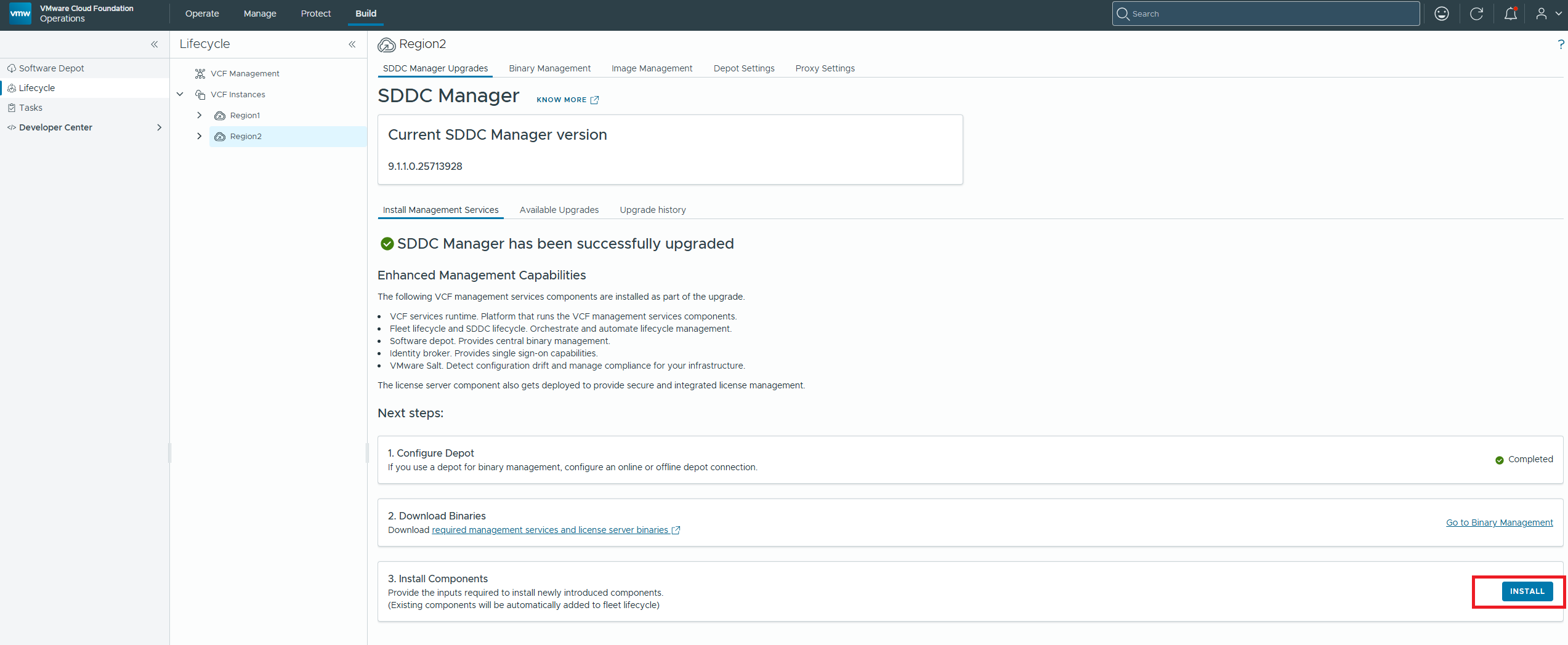
Once cleaned up, redeploy from VCF Operations: Build > Lifecycle > select the VCF instance > SDDC Manager Upgrades > Install Components.
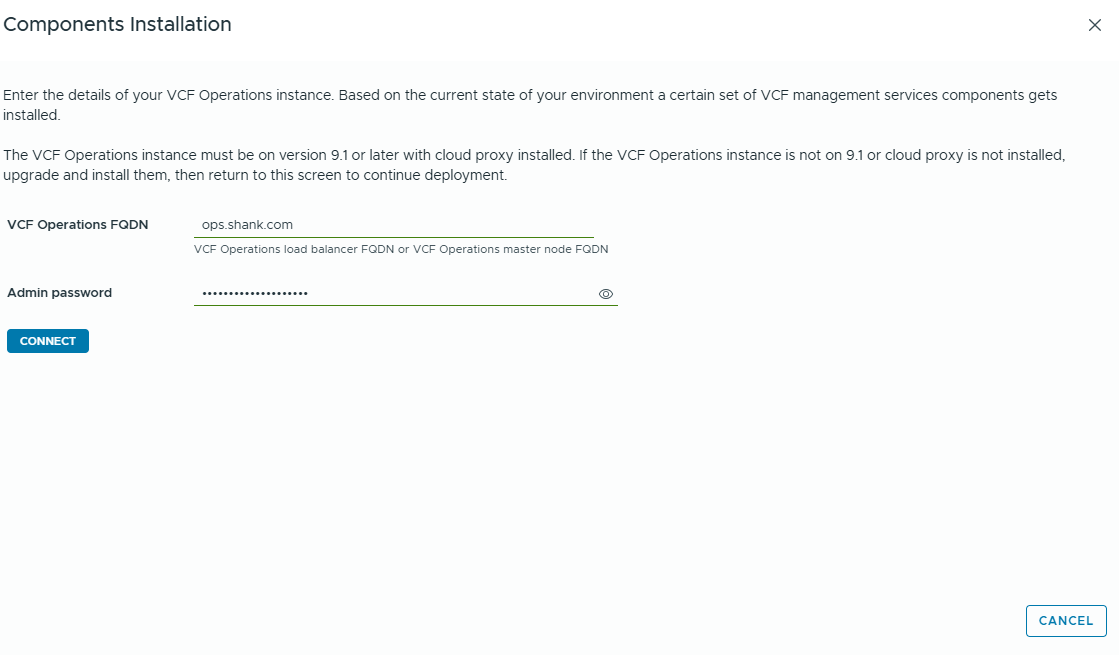

This time I made sure I selected Small, no HA!
Don’t wait 45 minutes to find out. About 15 minutes in, check the control plane count from the new bootstrap VM. Desired and current should both be 1:
export KUBECONFIG=/data/vmsp/<runtime-name>.kubeconfig; kubectl get kcp -A
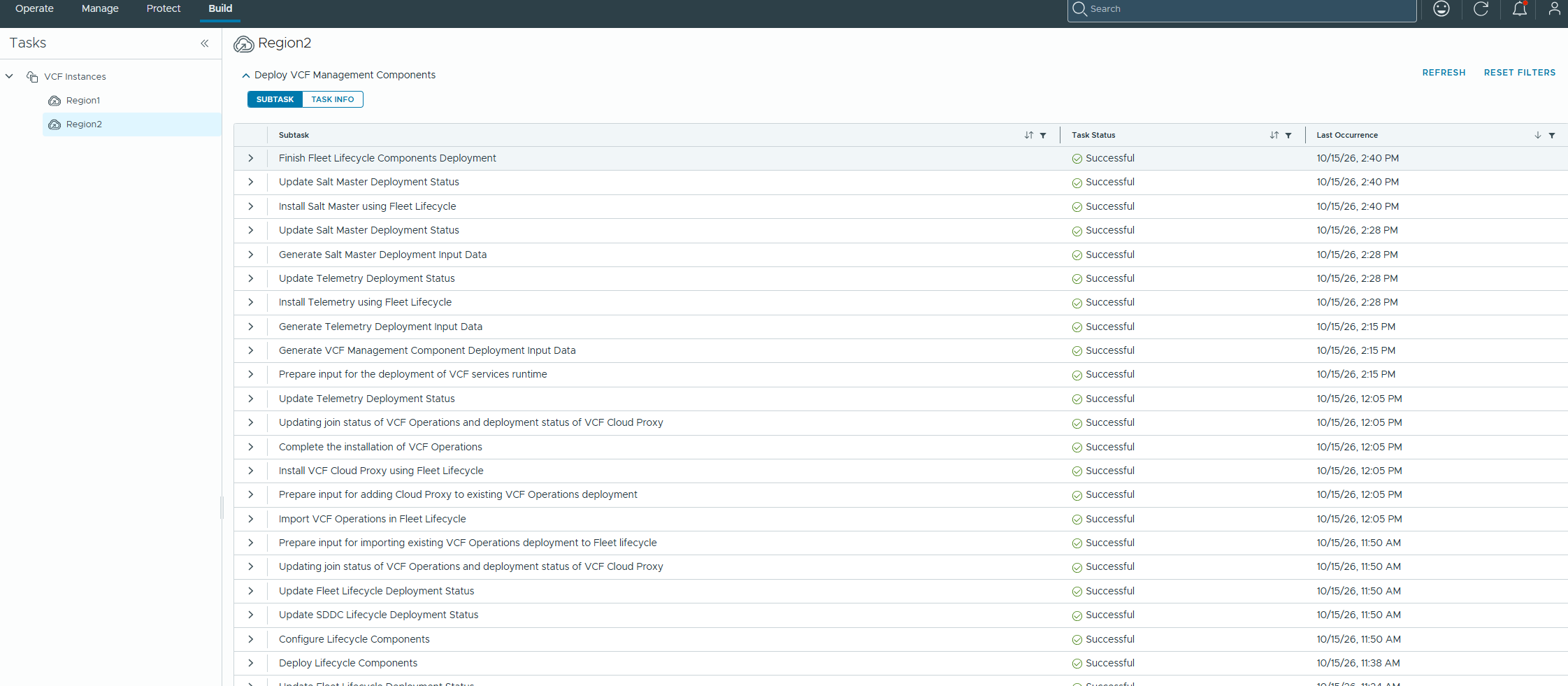
This time the deployment completed successfully.
Summary
When deploying VMSP, especially in a resource-restricted or lab environment, you may hit HEALTH0002 … Synthetic checks failed [VCFMS-BOOTSTRAP-999]. In my case it was the HA size, which deploys 3 control plane nodes. After the cluster is built, a synthetic health check confirms each control plane VM sits on its own ESXi host. With only 2 hosts that can’t be satisfied, so the bootstrap fails.
- On a 2-host management cluster, pick Small, not Small (HA).
- Check
kubectl get kcp -Aearly instead of waiting 45 minutes. - A retry won’t help: it reuses the same spec.
- The bootstrap VM’s installer log names the failing check. SDDC Manager’s log doesn’t.
Coming in part 2: stale components left in VCF Operations and Fleet after the redeploy, and a Telemetry deploy stuck for 2 hours.